The following article is intended to help customers collect and share necessary information for Yaskawa to help diagnose SimpleConnect issues. The following files and details can help facilitate an expedited review of your system & ideally a solution. Having the following details on-hand within Yaskawa typically gives the support team the necessary details to begin detailed troubleshooting.
The request for specific backed-up files and screen captures/photos are listed below. For those proficient in saving files, the following lists the files requested. For those needing details saving the requested files, see the step-by-step instructions for save in the individual files that are listed in the Appendix(s) below.
Key files to be shared with Yaskawa:
| File Title: | File Name: | Appendix for Saving Instructions: |
| Batch Parameters | ALL.PRM | Appendix A |
| C.IO PRGM | CIOPRG.LST | Appendix B |
| Alarm History Data | ALMHIST.DAT | Appendix C |
| Controller Information | PANELBOX.LOG | Appendix C |
| IO Message History Data | IOMSGHST.DAT | Appendix C |
| External IO Alloc Data | EIOALLOC.DAT | Appendix C |
| IP Network Set Data | IPNETCFG.DAT | Appendix C |
| Ethernet/IP Config Data | ETHERIP.DAT | Appendix C |
| System Backup (CMOS.BIN) | CMOS.BIN | Appendix D |
| User Defined File#1 | ActiveStandardOptions.bin | Appendix E |
| User Defined File#2 | DefaultAdapterInformation.csv | Appendix E |
| User Defined File#3 | Device FunctionInformation.csv | Appendix E |
| User Defined File#4 | Mapping.bin | Appendix E |
| User Defined File#5 | NonScDeviceFunctionInfo.csv | Appendix E |
| User Defined File#6 | StandardOptionInformation.csv | Appendix E |
| SimpleConnect System Info | SimpleConnect-SystemInfo.txt | Appendix F |
Screen capture or photo to be shared with Yaskawa:
-
Communication Monitor (Detail) screen See Appendix G for capturing instructions!
Zip & Ship Files to Yaskawa:
Zip, attach, and e-mail the requested files to techsupport@motoman.com or your established contact person at Yaskawa. Please include your Warranty ID# so internal documents and drawings can be referenced!
The following Appendixes detail the key presses required to save the requested files to the media specified under the "EX. MEMORY & DEVICE" settings.
APPENDIX A: ALL.PRM
APPENDIX B: CIOPRG.LST:
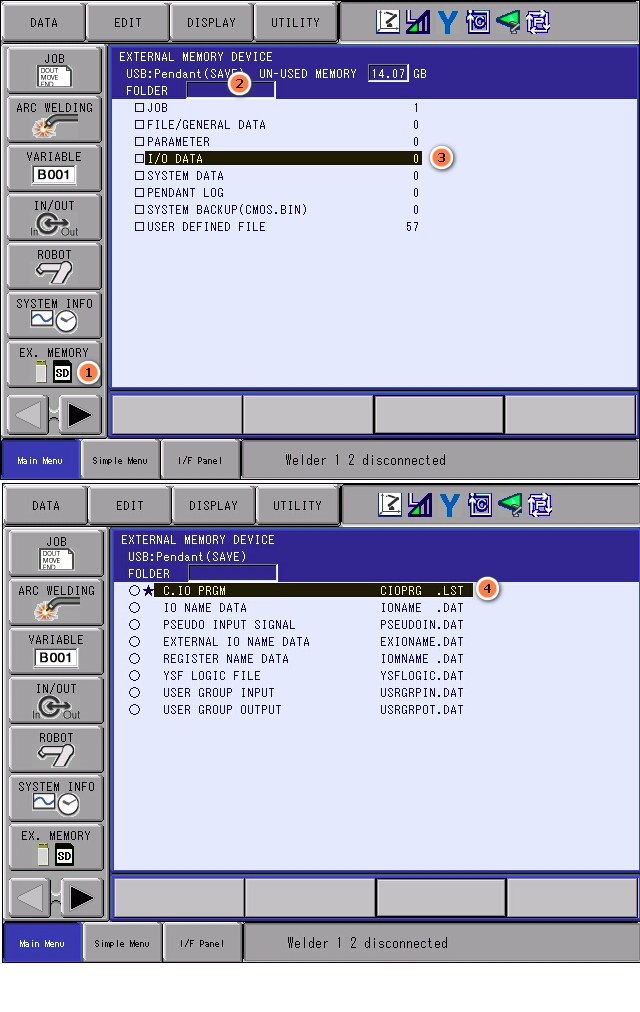 APPENDIX C: SYSTEM DATA
APPENDIX D: CMOS.BIN
APPENDIX E: USER DEFINED FILES
APPENDIX F: SimpleConnect File Log:
Appendix G: COMMUNICATION MONITOR (DETAIL) Screen shot/Photo
Details on how to perform a “screen capture” are contained here:
https://knowledge.motoman.com/hc/en-us/articles/4413241775895-Saving-Pendant-Screenshots